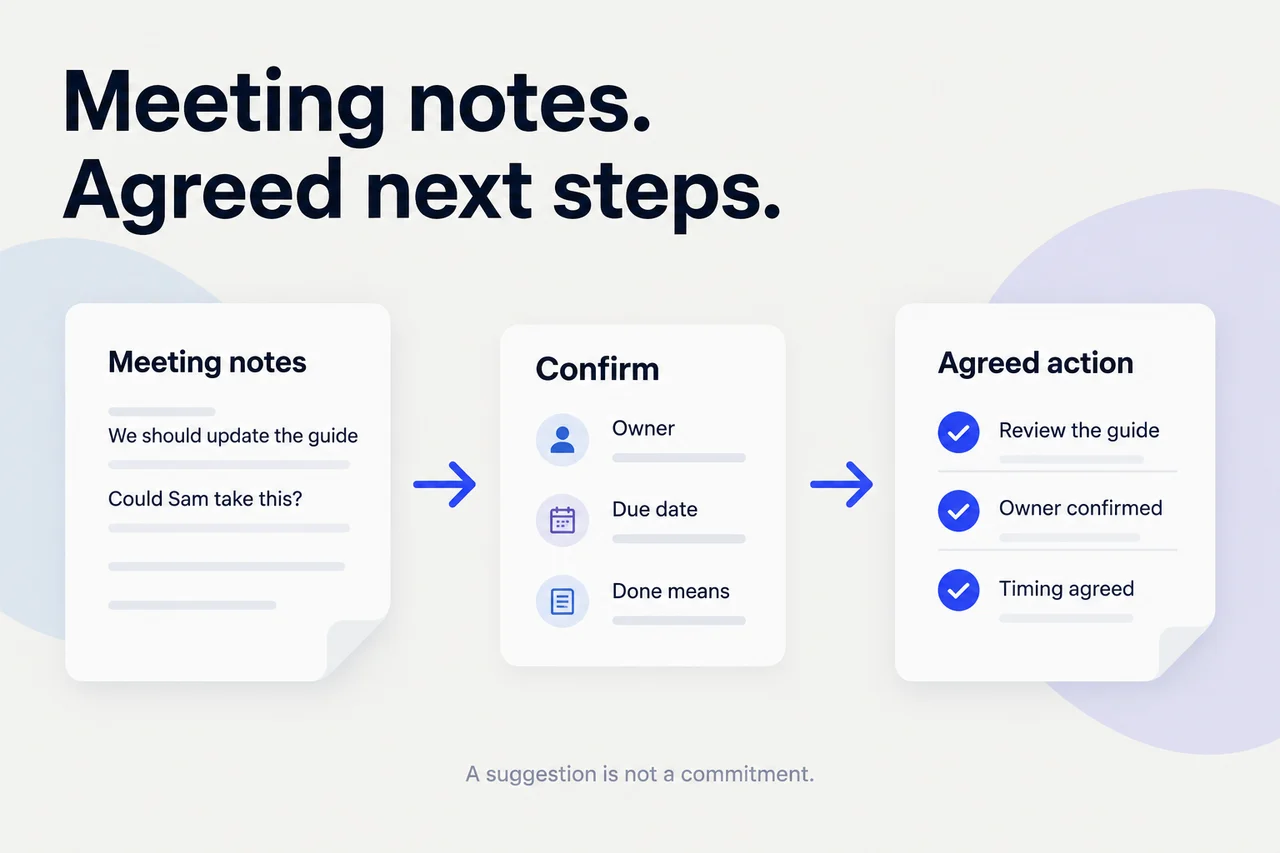
To turn meeting notes into useful action items, separate decisions from suggestions, identify the work each decision requires, and confirm the owner, timing, and definition of done. Keep a link to the original discussion. Then put agreed actions in the place your team already tracks work—not in another list nobody maintains.
The important step is confirmation. A tidy task list doesn't prove that the people named in it accepted the work.
You can start with a shared document or spreadsheet. The result should be a small set of clear commitments, plus a separate list of questions still needing an answer.
What should the finished action list look like?
Consider a team preparing a pilot. Its meeting notes contain four statements:
- “The pilot starts Monday.”
- “We should update the setup guide.”
- “Could Sam review it?”
- Sam: “Yes. I'll review the current guide by Thursday noon and leave comments in the document.”
These are not four tasks. There is a decision, a suggestion, a proposed owner, and an accepted review action. Nothing here confirms who will rewrite or publish the guide.
The action record can say:
ACTION: Review the current setup guide.
OWNER: Sam; acceptance recorded in the meeting.
DUE: Thursday noon; confirm the calendar date and zone.
DONE MEANS: Review comments added to the guide.
SOURCE: Link to the relevant meeting note or timestamp.
WORK RECORD: Existing guide-review task, if there is one.
OPEN QUESTION: Who owns revisions after the review?
Before entering a deadline, resolve which Thursday and which time zone. Before assigning revisions, ask who will take them. The pilot's start date doesn't silently create those commitments.
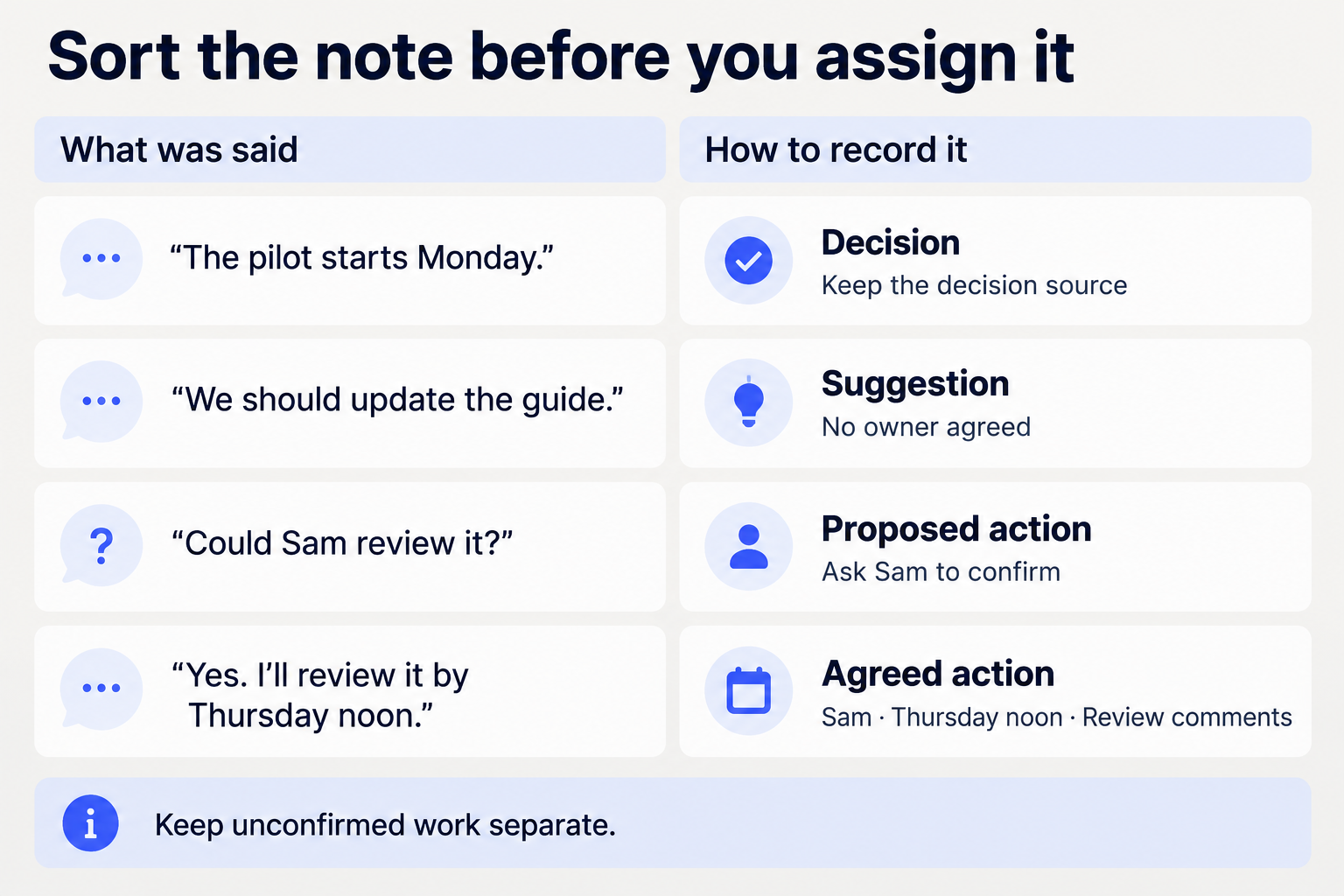
This distinction is the foundation of the workflow: capture what was agreed, and keep the rest visible without upgrading it into a promise.
1. What should you collect before extracting actions?
Start with the meeting date, notes or transcript, relevant decisions, and links to existing work. Include only material the people reviewing the action list may access.
If you have several versions of the notes, choose a working source and preserve links to corrections. Don't merge a rough transcript and a later summary as though both are equally authoritative. A transcript can misattribute a speaker; a summary can omit a condition.
For each candidate action, retain the sentence or passage that supports it. You don't need to copy an entire private conversation into a task. Keep enough context to explain the deliverable, and link to the source within the right permissions.
A useful starting question is: “What work did someone actually agree to do?” A second question catches the gaps: “What work is necessary, but still needs agreement?” Keep the answers separate.
2. How do you separate decisions, suggestions, and commitments?
Sort each relevant note before creating tasks:
| Type | What it establishes | What to do with it |
|---|---|---|
| Decision | A choice was made. | Record the choice and source; identify any resulting work. |
| Suggestion | Someone raised a possibility. | Keep it as a proposal, not an assignment. |
| Proposed action | Work or an owner was suggested. | Ask for acceptance and missing details. |
| Agreed action | Someone accepted a defined next step. | Confirm timing and completion criteria, then track it. |
“Let's ask legal” leaves the sender unconfirmed. “The team will handle it” leaves accountability unclear. “I can investigate” doesn't necessarily promise an implementation. Preserve those distinctions.
If a person wasn't at the meeting, being named in the notes isn't evidence they accepted the task. Send a confirmation request rather than treating the assignment as settled. Silence is not acceptance.
Decisions' guide to meeting action items also separates notes and decisions from tasks, and emphasizes owner acceptance, context, and a definition of done. Use that structure without assuming every discussion point needs a task.
3. What makes an action clear enough to agree to?
Write the action around an observable deliverable. “Onboarding” is a topic. “Review the setup guide and leave comments on missing steps” describes work someone can accept.
Confirm these details:
- Deliverable: What will the person produce or change?
- Owner: Who is accountable, and have they accepted?
- Timing: What date and time are agreed, or when will timing be resolved?
- Done: What result will establish completion?
- Dependency: What must happen first, and who can unblock it?
Keep contributors separate from the accountable owner. If two people own different outputs, split the action instead of writing both names beside an ambiguous task.
Don't manufacture a deadline to fill a field. If delivery timing is unknown, mark it unconfirmed and agree a checkpoint for resolving it. A date when someone will provide an estimate is not the delivery date.
Likewise, distinguish preparation from approval. “Prepare the announcement” doesn't include permission to publish it. Make the reviewer and the approval boundary explicit when the work needs them.
4. How should you confirm the actions with people?
Send a short confirmation while the context is still useful. Show the proposed commitment, the source, and the specific detail needing a response. Avoid sending a long summary and expecting the owner to discover the assignment inside it.
Adapt this message:
Following up on [meeting and date]:

Proposed action: [specific deliverable]
Proposed owner: [person]
Timing discussed: [date/time/zone, or unconfirmed]
Done means: [observable result]
Source: [note or timestamp link]

Can you confirm the scope and timing, or suggest
a correction? This is awaiting confirmation,
not a recorded commitment yet.
If the owner already accepted during the meeting, don't make them approve the same thing again. Share the captured wording for correction and ask only about unresolved details.
When the reply changes the scope or date, update the action record and retain the confirmation link. Don't leave two competing versions in circulation.
5. Where should agreed actions live?
Use the tracker your team already checks. The meeting note preserves the discussion; the working task holds the current delivery status. Link them rather than maintaining two independent deadlines.
Before creating anything, search for an existing task covering the same deliverable. If it exists, add the decision context or update it through your team's normal process. A fresh meeting doesn't require a fresh copy of the same work.
Asana's action log template provides one approach to tracking owners, due dates, progress, and outcomes together. A spreadsheet can use the same basic structure. The tool matters less than having one maintained working record.
Copy these fields into your existing system:
MEETING ACTION REGISTER
Action ID:
Meeting date and source link:
Decision this supports:
Deliverable:
Owner and acceptance source:
Due date/time/zone, or unresolved timing:
Definition of done:
Reviewer or approval needed:
Dependency and next checkpoint:
Working task link:
State: proposed / agreed / in progress / blocked / done / canceled
Latest confirmed update and date:
Completion evidence or cancellation decision:
Keep proposed items distinguishable from accepted work. If your tracker automatically notifies assignees or schedules reminders, review those effects before importing an unconfirmed list.
6. How do you follow up without creating more coordination?
Review exceptions: unresolved ownership, approaching commitments, blockers, and work reported complete without a result. You don't need a new meeting to reread every open task.
Ask for the smallest useful update:
Checking [action link], agreed for [date/time].
Is it on track, blocked, or ready for review?
If timing has changed, what dependency or decision
needs attention, and what is the proposed next checkpoint?
A missed date is a reason to clarify, not permission to invent a new one. Record the cause, proposed change, and any needed decision. Keep the earlier commitment visible instead of silently moving the deadline.
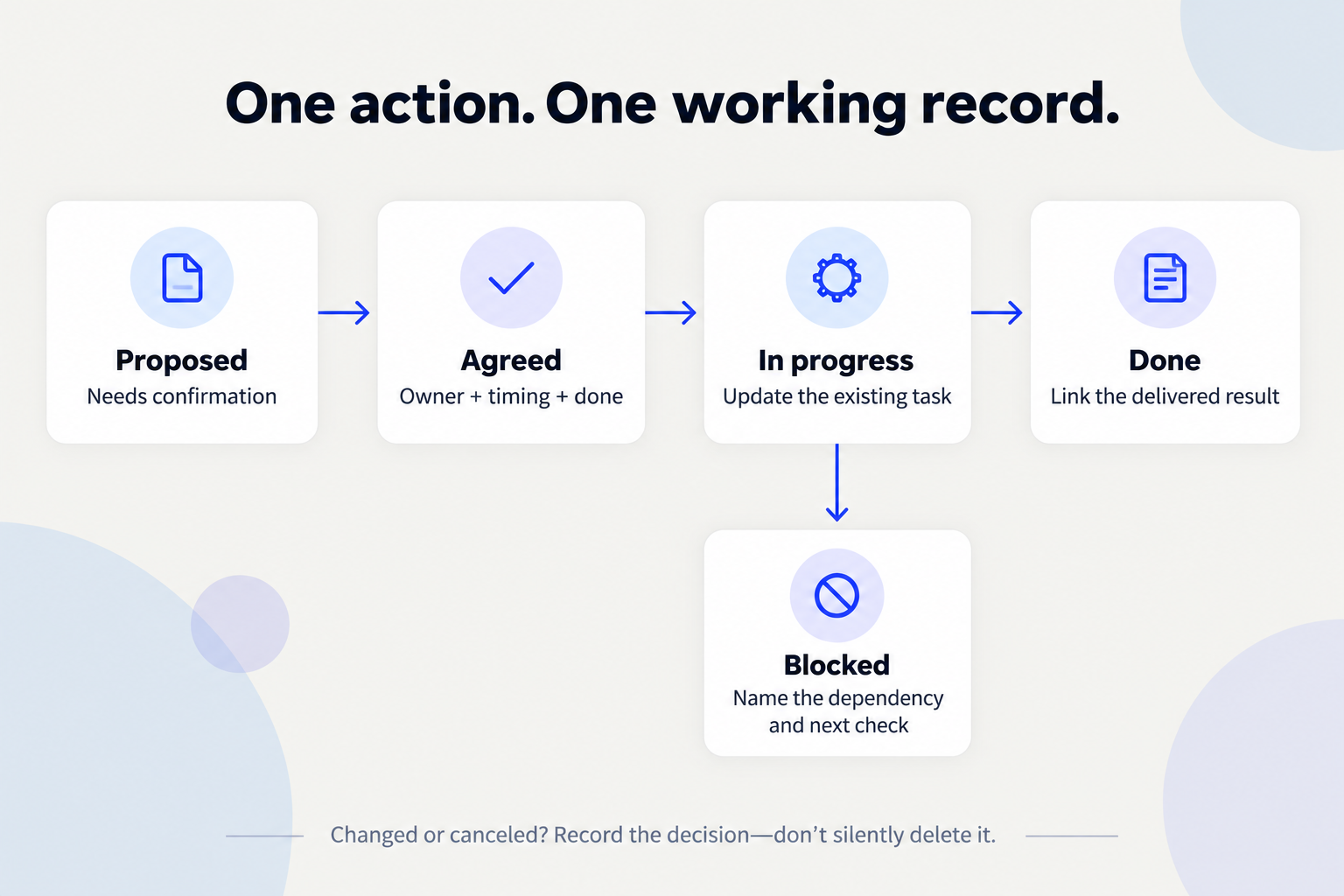
Close the action against its definition of done. A reviewed document isn't necessarily a published document. A prepared email isn't a sent email. Link the delivered result or confirmed outcome before marking it complete.
If priorities change, record that the action was canceled and why. Canceled work shouldn't look like successful delivery—or linger as an unexplained overdue task.
For an internal weekly founder brief, summarize only the commitments affecting a decision, delivery date, or customer promise. Keep the detailed action register in its working location.
7. Can AI prepare the list without assigning work?
Use AI to prepare candidate actions, not to decide what people agreed to. Give it sources and explicit boundaries:
From these meeting notes, prepare an action register.
Separate decisions, suggestions, proposed actions,
and explicitly accepted commitments.
Keep a source passage or timestamp for each item.
Use only owners and dates explicitly supported.
Flag unclear speakers, missing acceptance,
ambiguous dates, dependencies, and approval needs.
Do not infer that silence means agreement.
Check supplied task links for possible duplicates.
Draft confirmation questions for unresolved items.
Do not create tasks, send messages, or mark work done.
Return the register and questions for review.
Check that the assistant can access the supplied material. Review its classifications against the original notes, especially speaker attribution and conditional language.
If you use Juno, its product guidance describes carrying customer-call context into a Linear issue, with approval before creation. That can support the handoff once the work is agreed. It doesn't replace confirming ownership or authorize every task in a generated list.
When the agreed work involves notifying customers about a release, use a separate customer follow-up checklist to verify scope, access, and the actual send.
Frequently asked questions
Should every meeting produce action items?
No. A meeting may resolve a question without creating new work. Record the decision rather than inventing a task to make the notes look productive.
What if nobody accepts ownership?
Keep it proposed and name the unresolved ownership question. Ask the appropriate decision-maker to resolve it; don't assign the most likely person by inference.
What if two meetings mention the same action?
Keep one working task and link both sources. Check whether the later discussion changed the scope or timing before updating it.
What should you do first?
Choose one recent meeting. Separate its decisions from proposed work, confirm the unresolved details, and link each agreed action to one working record. Start there before adding automated reminders or another reporting layer.